Showing posts with label network administration. Show all posts

Wednesday, January 25, 2023

How Wifi Works

I've been following the MacAdmins Conference on YouTube for a few years and many of their panels are just excellent. Even if you don't use any products from Apple, many of their topics are things that any systems administrator might need to learn, like networking, documentation, and project management.

I have recommended one of their videos many times. It does a great job of explaining the physics underneith wifi and I think that really helps people appreciate just how complex it all is. It is also very helpful for building an understanding of what issues you may come across and how to correct them.

Sunday, March 12, 2017

G Suite and Social Security Numbers

A nearby school was hit with a spearphishing attack not long ago. As a result, their employee's personal information, including social security numbers, were stolen.

To protect my coworkers from a similar attack, I set up an email filter to catch messages with social security numbers in them. These messages are quarantined and reviewed by humans, who then visit the sender in person to review the situation. When I discussed this with my counterparts in other districts, they were very interested. So I decided to document the process here in case others could benefit.

At my job, we use G Suite for Education. It has a feature called "Content compliance" which uses regular expressions. So I went to admin.google.com, clicked on "Apps", clicked on "G Suite", and then clicked on "Gmail". From there, I clicked on "User Settings", selected the root OU, and scrolled down to "Content compliance".

In "Content compliance", I added a new rule. If you do this, make sure that rule affects outbound messages. I recommend also adding "Internal - sending" and "Internal - receiving", as well. This can help in the event of one coworker's account being compromised by a bad actor who then requests data from someone in Payroll. In my case, I enabled all three of those conditions. However, I didn't enable "Inbound". My thinking was that if the message already traveled across the Internet, it was already vulnerable and there was hardly a point. I recommend you consider your own case and make your own decision.

Then add the following regular expression (a.k.a. "regexp" or "regex") as a rule:

(^|\s)\d{3}-\d{2}-\d{4}(\s|[[:punct:]]|$)
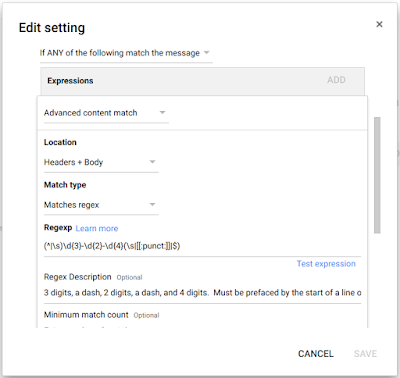
In step three, I set the action to "Quarantine message". Then I saved the settings.

Lastly, I ran some tests. I made a test account and sent several messages to it. Those included the fake social security number of "123-45-6789" in the subject, the body, and in an Excel file attached to a message. In each case, as the administrator, I was sent a message telling me a new message was delivered to the quarantine with a link to take me there. I had the chance to review the message and reject it or approve it. If rejected, the message is sent back to the original sender with a vague message about it violating the recipient's content policy.

One final note: Don't forget the human factors.

If you decide to implement this, I strongly recommend discussing quarantined messages with their senders prior to rejecting or approving them. In my experience, people have responded quite well to this approach. I always explain the events at our neighboring district (without naming them), explain that I took steps to protect us, and finally explain that their message was caught in this filter. Even in cases where they were sending their own tax forms to another account they control, they were sympathetic to my intent. I was also respectful of their right to make their own decisions -- even if it put them at risk.

I think of it this way: If Mrs. Smith sent her student loan paperwork to herself, then I gave her my advice. She may choose to accept it (and I reject the message) or to accept the risk (and I approve the message.) That is her choice, as she is only putting herself at risk. In cases where someone is putting someone else at risk (e.g. Payroll sending out W-2 paperwork for employees), I speak to them and confirm that it is legitimate. If it is, I try to help them find a safer way to get their work done. By taking this approach, people generally react well and are appreciative.

Tuesday, December 13, 2016

NTP Server Testing

If you run an NTP server, you should try this site. It is good for checking if your NTP server is available to your users when they're not on your internal network. It can also be helpful for running some security testing.

Tuesday, March 8, 2016

Graph Your Network Traffic

You need to graph your Internet usage, if not all network usage. I'm surprised I didn't write about this sooner. I talk about it frequently. It is one of the steps that separates a professional network or system administrator from someone just trying to keep things running. So let's dig into this.

Which discussion would you rather have when it's time to plan the budget:

A: "Things seem slow sometimes; especially during business hours. I believe that we should pay for a bigger Internet connection in order to address this."

...or...

B: "Here is a graph of our Internet usage over the last week. The dotted line across the top is what purchase from our ISP. The green line is our actual usage, with readings taken every 5 minutes. As you can see, our usage curves upward over the first hour that we're open and then hits the dotted line. Then we stay there until shortly after we close. Based on this data, I believe we should pay for a larger Internet connection."

I'm sure you can imagine other situations similar to these, but here are a few more: Justifying replacement of 100Mbps switches with 1000Mbps switches. Tracking down which device is flooding your network with poorly configured multicast traffic (rendering it useless for everyone else) in about 10 minutes. Figuring out if the lag you're experiencing is network congestion on your servers or a "full" Internet connection or if you just have too many devices on too few wireless access points.

These are all situations that you might really face. They're all situations that you can handle with aplomb if you set up network graphing. By looking at graphs of how much traffic is going through each switch in your network, you can quickly spot patterns that might otherwise be invisible.

If you don't know where to start, then I recommend checking out Cacti. By installing it on a server of your choice, you can start building graphs through a web app. For example, I started up my favorite free Unix-like system (FreeBSD) on a virtual server, installed Cacti quickly from the FreeBSD ports collection, added SNMP version 1 / read-only community names to all of my switches (easier than it sounds,) and started adding them to Cacti through a nice web-based interface. It was surprisingly easy, even though it took some time. I'd recount how to do it for you, but the reality is that other people on the Internet have already done a better job. Find a guide for your preferred server OS and give it a try.

The bottom line here is this: Even the most talented systems administrator doesn't know about the things they're not measuring. Make your systems measure themselves so you can make better decisions -- especially when speaking to your manager or anyone with the ability to shape the budget. If you're not sure where to start, try Cacti, because it's free, not overwhelmingly complex, and has enough ability that many professionals prefer it to the commercial products.

Tuesday, January 12, 2016

Packet capture on chromebooks

The excellent Stephen Gale shared a great tip recently on Google+.

In short, if you have a chromebook and were wishing for some packet capture software or other good network debugging tools, you just need to type "chrome://internals" into the address bar. There are also some great tools in Developer Mode, if you want to go that route. If you only want to know details about the current tab or page, you can go to the Developer Tools (which is different than Developer Mode, despite the similar names.)